YouGooDai
Mobile of the Day

YouGooDai

5.0 FREE
  • Screenshot 1
  • Screenshot 2
  • Screenshot 3

Description

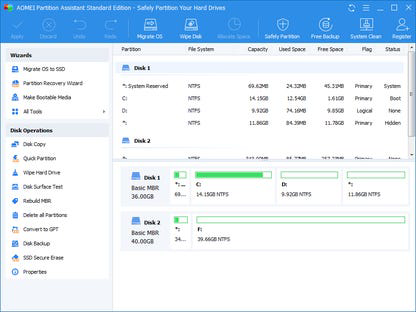
About AOMEI Partition Assistant StandardAOMEI Partition Assistant Standard is a professional multilingual disk partition software designed for 32-bit or 64-bit versions of Windows 10, 8.1, 8, 7, Vista, and XP. This versatile software offers a wide range of features that enable users to manage their disk partitions effectively and efficiently. With its user-friendly interface and powerful tools, AOMEI Partition Assistant Standard is an essential utility for managing your disk partitions and optimizing your system performance. Key Feature 1: Comprehensive Partition Management AOMEI Partition Assistant Standard allows users to resize, move, extend, merge, split, align, create, delete, and format partitions with ease. This comprehensive set of partition management tools ensures that users can effectively organize and optimize their disk space according to their needs. 2: MBR and GPT Conversion The software enables users to convert their system disk between MBR and GPT styles, providing flexibility and compatibility with various storage devices and partition schemes. This feature ensures that users can easily switch between different partition styles to suit their system requirements. 3: OS Migration to SSD AOMEI Partition Assistant Standard supports migrating the operating system to an SSD, ensuring a smooth transition and optimal performance. This feature is particularly useful for users looking to upgrade their system storage or improve system responsiveness. 4: Bootable Media Creation The software allows users to create bootable media, such as a Windows 10/8/7 bootable USB drive, which can be used to troubleshoot or repair system issues. This feature ensures that users can quickly and easily recover their system in case of a failure or corruption. 5: Support for 4096 Byte Sector Size and More AOMEI Partition Assistant Standard supports disk with 4096-byte sector size and more, ensuring compatibility with a wide range of storage devices and partition schemes. This feature allows users to manage their disk partitions effectively, regardless of the disk's sector size. In conclusion, AOMEI Partition Assistant Standard is a powerful and versatile disk partition software that offers a comprehensive set of tools for managing disk partitions on Windows systems. With features such as comprehensive partition management, MBR and GPT conversion, OS migration to SSD, bootable media creation, and support for 4096-byte sector size and more, AOMEI Partition Assistant Standard is an essential utility for optimizing your system performance and managing your disk partitions with ease.Reviewed by Lizzie M. WalshShow MoreShow Less

Guides & Tutorials for AOMEI Partition Assistant Standard

How to install AOMEI Partition Assistant Standard
  1. Click the Preview / Download button above.
  2. Once redirected, accept the terms and click Install.
  3. Wait for the AOMEI Partition Assistant Standard download to finish on your device.
How to use AOMEI Partition Assistant Standard

This software is primarily used for its core features described above. Open the app after installation to explore its capabilities.

User Reviews for AOMEI Partition Assistant Standard 0

    No reviews found

Similar Apps
